






The CommunicationCenter consolidates incoming customer communications as well as the creation and delivery of outgoing emails directly within Business Central.
Emails, inquiries, documents, and business records are processed centrally, assigned to related contacts or transactions, and sent manually or automatically using flexible scenarios.

Many companies use Business Central for their business processes but still handle emails through Outlook, shared mailboxes, and manual workflows.
This consumes valuable time, creates media disruptions, and makes structured processing more difficult.

CommunicationCenter brings incoming email processing and outgoing communication directly into your ERP system. Teams can work more efficiently, automate recurring email processes, and maintain a clear connection to contacts, transactions, and business documents.
A Business Central Agent can further support users by preparing incoming emails and generating suggested responses.


Process service and support emails directly in Business Central instead of managing them through unstructured shared mailboxes.
Invoices, confirmations, and electronic documents—including ZUGFeRD, XRechnung, and Peppol formats—can be sent manually or automatically based on defined scenarios.
Assign emails directly to contacts, business transactions, and documents. This ensures incoming and outgoing communication as well as sent documents remain fully traceable.
Create customized email layouts based on Word templates and reports. Additional documents such as terms and conditions, delivery notes, or technical data sheets can be attached automatically.
The Business Central Agent prepares incoming customer communications, links relevant documents, and generates suggested responses based on available information.
Efficient Processing of Service and Team Mailboxes
Incoming emails sent to central service addresses are imported into Business Central, where they can be assigned, processed, and tracked efficiently.
Automatically Send Invoices and Electronic Documents via Email
Send invoices, electronic business documents, and formats such as ZUGFeRD, XRechnung, and Peppol directly from Business Central—either manually or automatically.
Order and Shipping Communication Directly from Business Central
Send order confirmations, shipping notifications, and other process-related documents directly from Business Central using CommunicationCenter.
Prepare Incoming Customer Communications with AI
The Business Central Agent analyzes incoming emails, links related documents, and generates suggested responses. Typical scenarios include answering delivery status inquiries, locating invoices or sales orders, assigning customer requests to transactions, or preparing service cases.
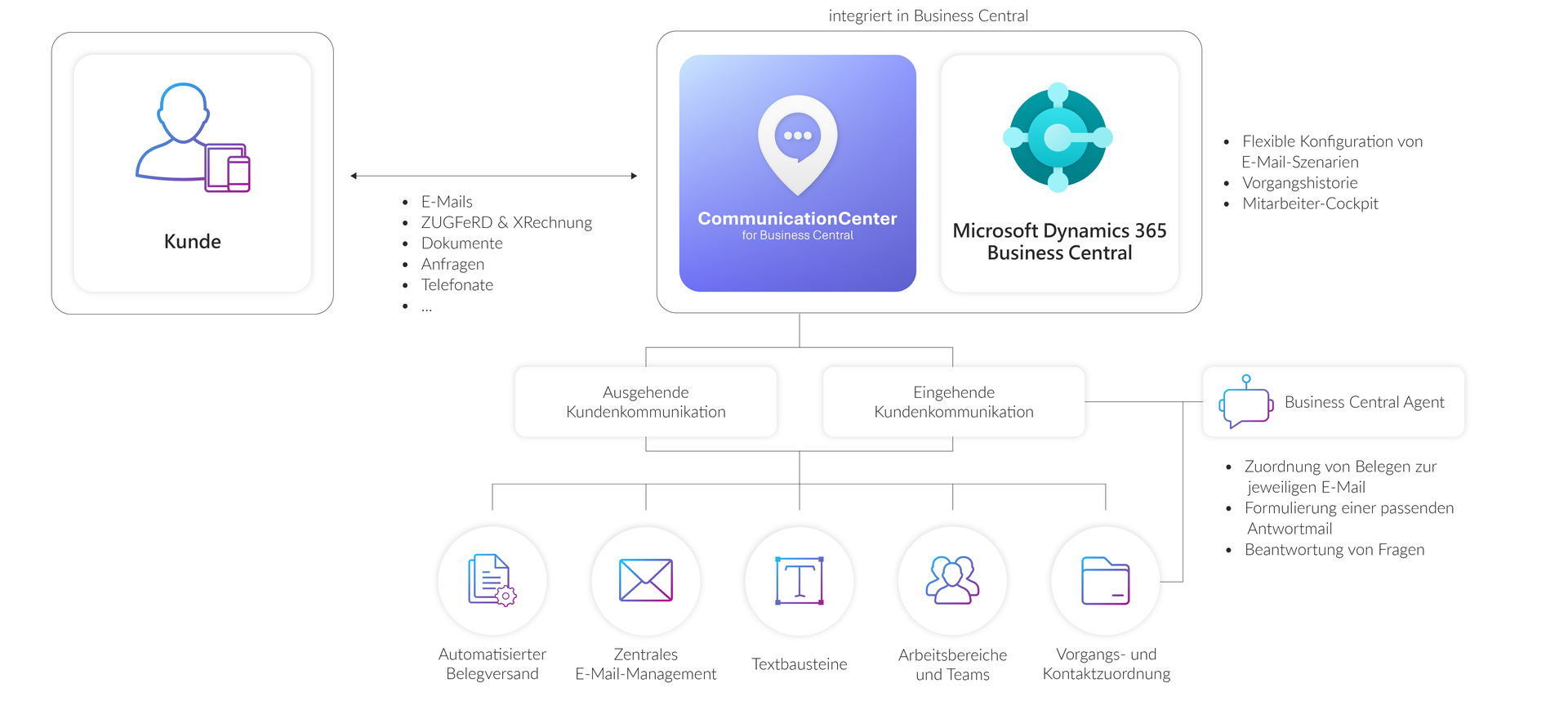
CommunicationCenter for Business Central connects customer communication, email processing, and outbound email delivery directly with Microsoft Dynamics 365 Business Central.
Incoming emails from connected mailboxes can be processed centrally, assigned to contacts, transactions, or documents, and handled collaboratively by teams. For incoming customer communications, a Business Central Agent can additionally use artificial intelligence to retrieve information from related documents and prepare suggested responses.
At the same time, outgoing emails, documents, and business records can be sent manually or automatically using flexible scenarios. Typical examples include invoices, electronic documents (such as ZUGFeRD and XRechnung files), order confirmations, shipping notifications, and service-related communications.

Central processing of incoming emails directly within Business Central

Import of emails from connected Exchange Online mailboxes

Processing of emails stored in shared service and team mailboxes

Create, reply to, and forward emails directly within Business Central

AI-supported processing of incoming customer communications

Automatic assignment to existing contacts or business transactions

CommunicationCenter scenarios for manual and automated email delivery

Sending electronic invoices and electronic business documents, such as ZUGFeRD and XRechnung
Would you like to learn more about how CommunicationCenter for Business Central is installed and configured? Our technical documentation provides further information about setup, features, and usage scenarios.


CommunicationCenter for Business Central is designed for companies using Microsoft Dynamics 365 Business Central that want to manage their incoming and outgoing email communication more efficiently.
The solution is particularly well suited for companies that:
Talk to us about your processes and discover how CommunicationCenter for Business Central can be implemented in your organization.
Pflichtfelder sind mit einem * gekennzeichnet.
I agree to the collection and processing of my personal data in accordance with the data protection declaration.
CommunicationCenter is designed for companies using Microsoft Dynamics 365 Business Central that require structured processing of incoming emails and automated outbound email workflows.
Yes. CommunicationCenter supports shared mailboxes such as info@, service@, support@, or customerservice@. Incoming emails can be processed directly within Business Central and handled collaboratively across teams.
Yes. Using CommunicationCenter scenarios, emails can be sent either manually or automatically. Typical examples include invoice delivery, order confirmations, shipping notifications, and electronic business documents such as ZUGFeRD and XRechnung.
Typical examples include invoices, order confirmations, shipping information, and electronic business documents.
Yes. Email designs are based on Word templates and reports, allowing different layouts to be created and customized according to your requirements.
A Business Central Agent can analyze incoming emails, link related documents such as sales orders or invoices, and prepare suggested responses. Whenever possible, information from the assigned documents is used to answer questions included in the email.
Typical examples include providing delivery status information, locating the correct invoice or sales order, assigning customer inquiries to business transactions, or preparing a service case.
Yes. CommunicationCenter supports email and document delivery from Business Central in the context of electronic invoicing and electronic business documents, including ZUGFeRD, XRechnung, and Peppol.

![[Translate to Englisch:] Andreas Blom Ansprechpartner](/fileadmin/Bilder/Bilder_Fotoshooting/Ansprechpartner/Ansprechpartner_Unterseiten/Andreas_Blom_Ansprechpartner.jpg)
