





With SharePoint and Microsoft Power Automate, recurring processes such as approvals, authorizations, or document filing can be automated and standardized. Companies reduce manual effort, increase process quality, and create transparent workflows.
TSO-DATA supports you in using SharePoint specifically for automating your business processes – integrated into your existing system landscape.

Many business processes in companies still run manually or are insufficiently structured – often via emails, Excel, or individual coordination.
Typical problems:
Result:
Inefficient workflows, unclear responsibilities, and unnecessary loss of time.
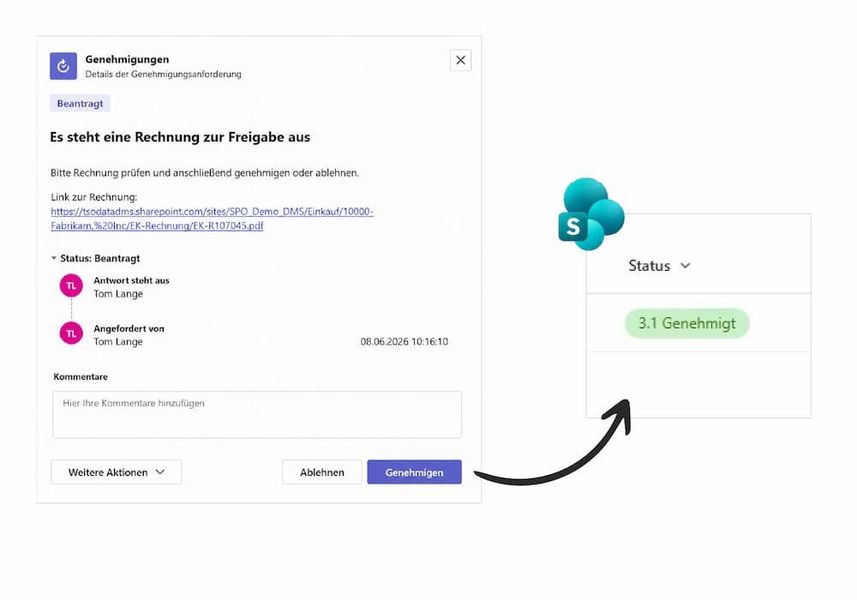
A workflow is a defined, automated sequence of tasks and decisions that structures and controls a business process.
How do workflows work with SharePoint and Power Automate?
Power Automate connects SharePoint with other Microsoft applications and automates processes – e.g. through triggers, actions, and approval steps.
Example:
A document is uploaded → automatically sent for approval → archived after approval.
Invoice approvals
Document approvals
Leave and travel requests
Document filing & archiving

In short:
Individual tasks become structured processes.

To automate processes, suitable workflows are first identified and clearly structured.
Then triggers and actions are defined to control the workflow, and integration into existing systems is implemented.
Finally, the workflow is tested and continuously optimized to ensure efficient and transparent processes.
Consequence:
Automation does not deliver the expected benefits.
Result:
Efficient processes and trained users.
Digitize your workflows with SharePoint and Power Automate and create clear, transparent processes in your company. Schedule a consultation now.
Pflichtfelder sind mit einem * gekennzeichnet.
I agree to the collection and processing of my personal data in accordance with the data protection declaration.
Power Automate is a Microsoft tool for automating processes and workflows across different applications.
Typical examples include approvals, authorizations, document filing, and request processes.
Yes, for example with Business Central via the DMS Connector.
Yes, especially for recurring processes with clearly defined workflows.

![[Translate to Englisch:] Andreas Blom Ansprechpartner](/fileadmin/Bilder/Bilder_Fotoshooting/Ansprechpartner/Ansprechpartner_Unterseiten/Andreas_Blom_Ansprechpartner.jpg)
