






Microsoft has also released a new February 2023 update for Power BI, its popular business intelligence platform. The update brings a number of new features and improvements that enable users to analyze data even faster and more effectively. We'd like to highlight a few selected ones here.
New accessible report designs
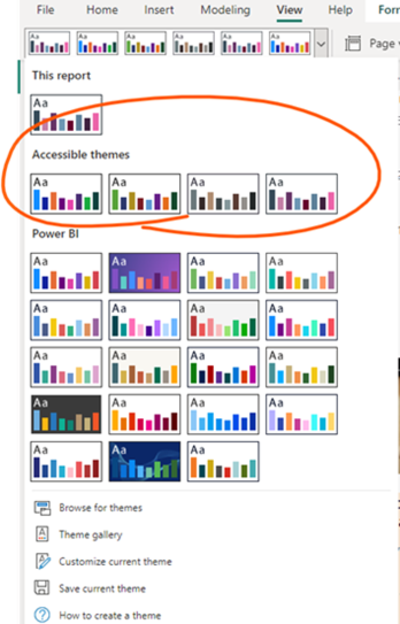
To help authors create accessible reports with good contrast in their colors, Microsoft has added some new accessible report designs to the Design drop-down list on the View tab of the ribbon this month. These can be found in a new section called Accessible Themes.
New "Get Data" experience in the Power BI service
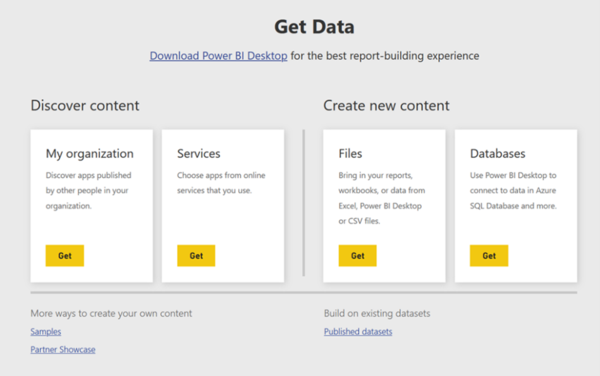
As announced in December, Microsoft has now completed the process of removing the older "Get Data" page in the Power BI service in favor of the new, similar features now available in workspaces. The change has removed the entry points to the old "Get Data" page, as shown below.
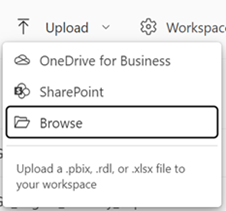
From now on, the similar feature can be accessed within workspaces. If a file is to be uploaded to Power BI, such as a PBIX, .xlsx or RDL file, the Upload option, which was released in November, can be used. This option can be used to upload files from the local computer or connect to files on OneDrive or a SharePoint site. With this change, connections can no longer be made to files in OneDrive personal accounts.
If one wants to create a dataset from Excel or CSV data instead, this functionality can now be accessed via the New >-Dataset option in the workspace where the dataset is to be created.
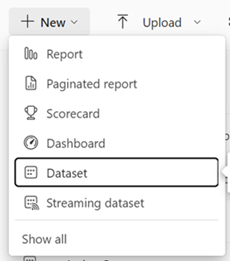
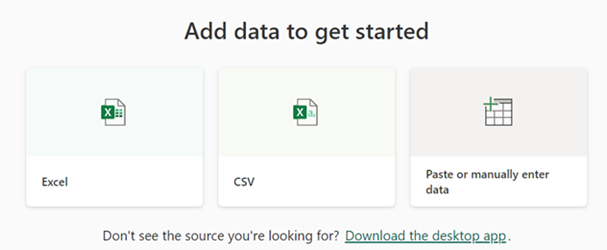
This dataset option has also been updated to take users to a new page with options to create a dataset from Excel, CSV or to insert data. Once they select the file, the behavior for generating the dataset is the same as before on the "Get Data" page. Once the dataset is created, one will be redirected to the dataset detail page in the Data Hub.
This and more features and info about the February update can be found on the Microsoft Power BI blog and in the video here.
Want to learn more about Power BI or have questions about individual features? Our experts will be happy to assist you.
TSO-DATA
Jan Grundmann
bi[at]tso[dot]de
+49(541) 1395-747